


Use onomeo in VS Code chat
The chat built into VS Code (GitHub Copilot Chat) can run on a model you choose, with no GitHub sign-in and no Copilot plan. Follow the six steps below to add this site as a custom endpoint and use its models.
The chat built into VS Code, on a model you choose.
The three values it asks for
OpenAI-compatible
Use these details in any OpenAI-compatible tool.
No key yet? Create one on the My account page, then come back — the fields below fill in by themselves. Go to My account
Step by step
Open the model list
In VS Code, press Ctrl+Shift+P (Cmd+Shift+P on macOS), type Chat: Manage Language Models and press Enter.
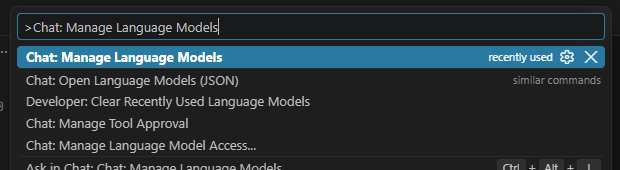
Pick the first result. Add a custom endpoint
In the Language Models window, press Add Models and choose Custom Endpoint at the end of the list.
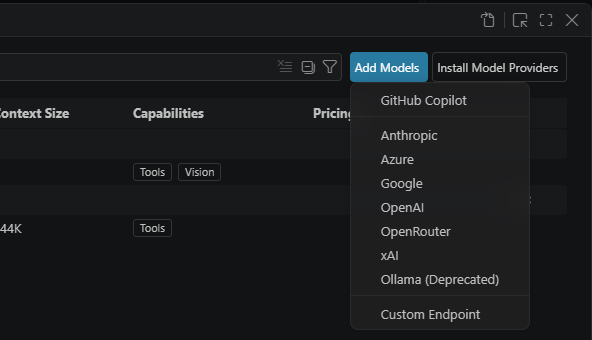
Press Add Models, then the last entry. Enter the name, your key and the API type
VS Code asks for three things at the top of the window, one after another. Group Name: type onomeo. API Key: paste your key (copy it from "The three values it asks for" above). API Type: choose Chat Completions. Press Enter after each one.
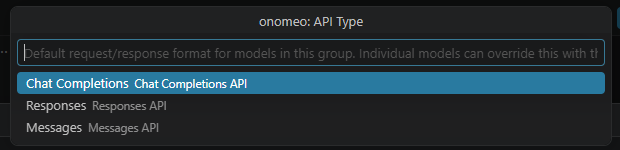
For the third one, choose Chat Completions. Fill in the model
VS Code then opens chatLanguageModels.json with an empty model in it, and the cursor already sits between the quotes after "id". Type auto and press Tab; type onomeo auto and press Tab; paste the address below. Then save with Ctrl+S (Cmd+S on macOS).
https://onomeo.com/v1/chat/completions
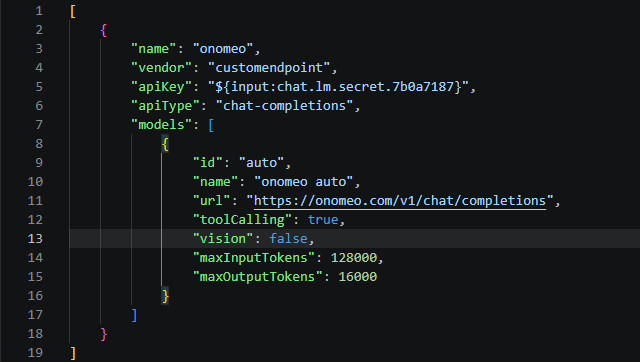
The file once it is filled in. Your key is not in this file; VS Code keeps it separately. If the cursor has moved, click between the quotes first. The url is the full address ending in /chat/completions. The model that auto picks may not read images, so you can change true to false on the "vision" line. To add another model from the Models page, copy the whole model block (from { to }), paste it after this one with a comma between them, and change its id and name.
Pick the model in chat
Close the file. Open chat with Ctrl+Alt+I (Ctrl+Cmd+I on macOS), press the model name under the input box and choose onomeo auto.
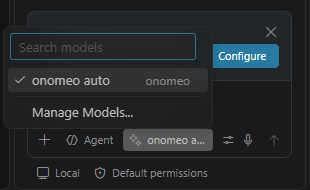
Once it is chosen, onomeo auto shows under the input box. Give it a task
Type what you want done in the input box and press Enter. In Agent mode it creates and changes files by itself, and asks before it runs a command.
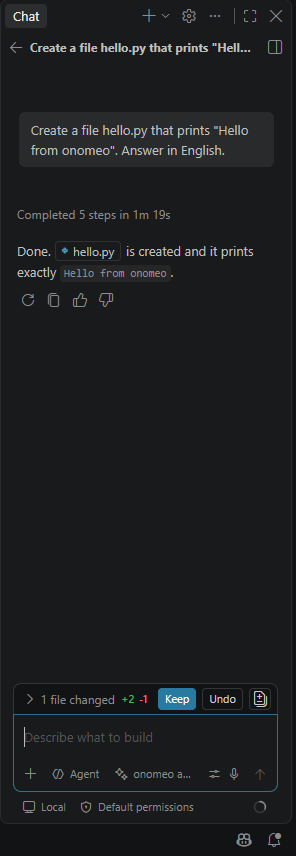
Here it was asked to create hello.py. Keep accepts the change; Undo takes it back. Each step counts as 1 call, and a long step counts as several by its length. Measured on 9 October 2026 with VS Code 1.141: the task above, with the file run once to check it, took 3 calls on auto and was not charged. The "Set BYOK utility models" card above the input box can simply be closed; chat works without it.
If it will not connect
- Without a GitHub sign-in, chat works, but inline suggestions and semantic search do not; those two still need a GitHub account.
- If your organization has turned off bringing your own key, Custom Endpoint cannot be used; ask its administrator.
- Coding sends whole files along with each request. On free models that is not charged, but a long request counts as several calls; Claude, GPT and other big models are charged by usage, and the balance goes quickly.
- 401: the key is wrong; add the endpoint again from step 2 with the right key, then delete the old group from chatLanguageModels.json. 402: insufficient balance. Claude, GPT and other big models are charged by usage; top up on the Pricing page or switch to a free model.
- Once your own provider keys are connected on the My providers page, put my/<provider>/<model> in "id" to answer on your own allowance instead. Nothing else changes, and this site does not charge for these calls.