


Use onomeo in Continue
Continue keeps its models in one configuration file. Follow the four steps below to write onomeo into it with one command, and this site's models work in your editor.
AI assistance inside your editor.
What to fill in
OpenAI-compatible
Use these details in any OpenAI-compatible tool.
Step by step
Screenshots and dated measurements show earlier tests. Their model names and costs are historical; use the current model and pricing shown above.
Install Continue
In VS Code, click the Extensions icon on the left, search for Continue and install the one published by Continue.
Save the configuration
On Windows, press the Windows key, type PowerShell and press Enter. On macOS, open Terminal. Press Copy, paste the command in and press Enter. It writes this site's address, your key and the model into Continue's configuration file.
$f = "$HOME\.continue\config.yaml"
if (-not (Test-Path $f) -or ((Get-Content $f -Raw) -match 'models:\s*\[\]')) {
if (Test-Path $f) { Copy-Item $f "$f.bak" -Force }
New-Item -ItemType Directory -Force -Path (Split-Path $f) | Out-Null
[IO.File]::WriteAllText($f, @'
name: onomeo
version: 1.0.0
schema: v1
models:
  - name: onomeo MODEL_ID
    provider: openai
    model: MODEL_ID
    apiBase: https://onomeo.com/v1
    apiKey: YOUR_API_KEY
    roles:
      - chat
      - edit
      - apply
'@)
Write-Host "Saved: $f" -ForegroundColor Green
} else { Write-Host "Config file already exists, left unchanged: $f" -ForegroundColor Yellow }
Replace YOUR_API_KEY in the command with your key. Once you create a key in this browser, it is filled in here.

When the last line reads Saved in green, the configuration is in place. The first time Continue opens, it writes a configuration file with no models; the command replaces that one and keeps it as config.yaml.bak. If the yellow line "Config file already exists, left unchanged" appears, you have set up models in Continue before: open the file it names in Notepad and add the entry under models above.
Open Continue
Click the Continue icon on the left of VS Code.
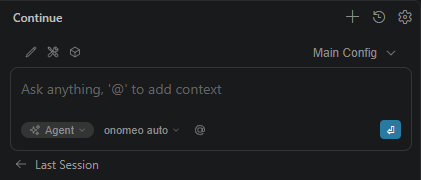
When "onomeo auto" shows below the input box, Continue has read this site's configuration. Ask it something
Type a line in the input box and press Enter.
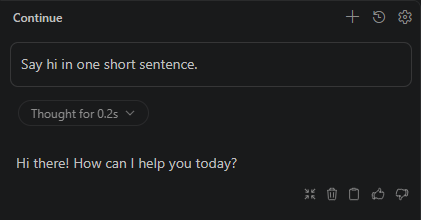
A reply means everything works.
If it will not connect
- Keep provider as openai: it tells Continue to speak the OpenAI format; apiBase is what sends the requests here.
- To switch models, change the model: MODEL_ID line in the file to a name from the models page and save; Continue reads it again by itself.
- Once your own provider keys are connected on the My providers page, put my/<provider>/<model> in the model line to answer on your own allowance instead. The other lines stay the same, and this site does not charge for these calls.