


Use onomeo in Codex
Codex is OpenAI's coding agent for the terminal. Follow the six steps below to write this site into its configuration file and use its models.
OpenAI's coding agent for the terminal.
What to fill in
OpenAI-compatible
Use these details in any OpenAI-compatible tool.
No key yet? Create one on the My account page, then come back — the fields below fill in by themselves. Go to My account
Step by step
Install Codex
On Windows, press the Windows key, type PowerShell and press Enter. On macOS, open Terminal. Paste the line below and press Enter.
npm install -g @openai/codex
If npm is not found, install Node.js (the LTS version) from nodejs.org first, then close PowerShell and open it again.
Write the configuration
Press Copy, paste into the same window and press Enter. The command writes this site's address, your key and the model auto into Codex's configuration file.
$f = "$HOME\.codex\config.toml"
if (-not (Test-Path $f)) {
New-Item -ItemType Directory -Force -Path (Split-Path $f) | Out-Null
[IO.File]::WriteAllText($f, @'
model_provider = "onomeo"
model = "auto"

[model_providers.onomeo]
name = "onomeo"
base_url = "https://onomeo.com/v1"
wire_api = "responses"
experimental_bearer_token = "YOUR_API_KEY"
'@)
Write-Host "Saved: $f" -ForegroundColor Green
} else { Write-Host "A configuration file already exists, left unchanged: $f" -ForegroundColor Yellow }
Replace YOUR_API_KEY in the command with your key. Once you create a key in this browser, it is filled in here.
A green "Saved" on the last line means the configuration is in. A yellow "already exists" means Codex was set up before: open the file it names in a text editor and add the contents of the box above at the end (the model_provider and model lines at the top replace the two lines of the same name already there).
Start Codex
Go to your project folder first (for example, type cd D:\my-project and press Enter), then run the line below. The first start asks whether you trust the folder (Do you trust the contents of this directory?): press Enter for Yes, continue.
codex
Choose the sandbox
It then asks about the sandbox (Set up the Codex agent sandbox): press the down arrow key once to reach Use non-admin sandbox, then Enter; no administrator rights are needed. The box above now reads model: auto, which means the configuration is in use.
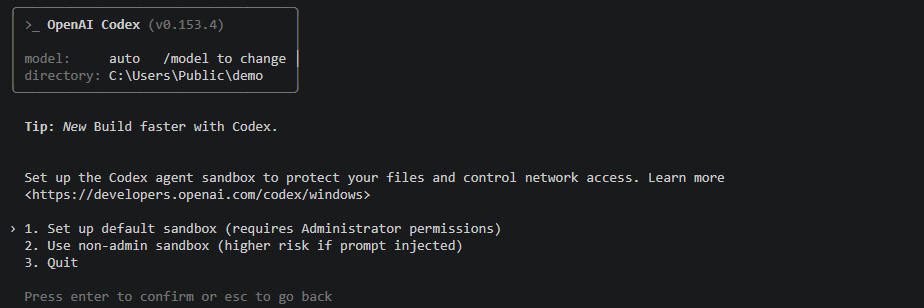
The box reads model: auto; the second sandbox choice is enough. If PowerShell is running as administrator, the first choice is safer.
Give it a task
Type what you want done and press Enter. Before writing a file or running a command, Codex asks Would you like to run the following command?: press Enter for Yes, proceed.
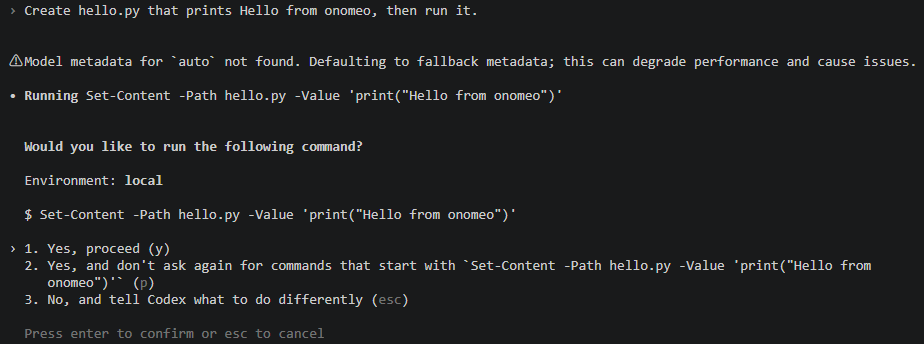
It asks once before each command; press Enter. The line "Model metadata for auto not found" that appears after the first message is Codex noting it does not know the name auto; it does not affect anything.
See the result
Once the commands have run, Codex reports the result, and the bottom line shows the model it used, auto.
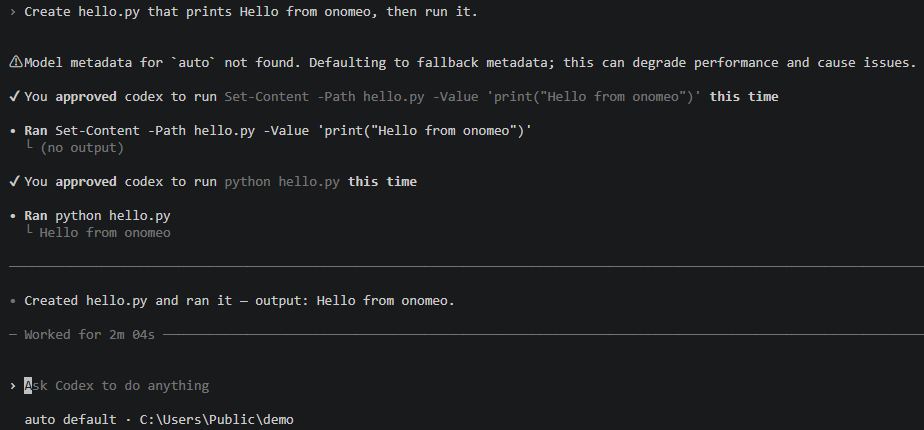
Here it was asked to create hello.py: it wrote the file, ran it and reported the output; the bottom line shows the model auto. Each step counts as 1 call, and a long step counts as several. Measured on 9 October 2026 with Codex 0.153.4: the task above took 4 calls on auto and was not charged.
If it will not connect
- Keep /v1 at the end of the address and add nothing after it. wire_api must be responses; newer Codex no longer supports chat.
- To use another model from the Models page, change the line model = "auto" in the configuration file and start Codex again.
- Coding sends whole files along with each request. On free models that is not charged, but a long request counts as several calls; Claude, GPT and other big models are charged by usage, and the balance goes quickly.
- An answer that reads "onomeo could not run this request (bad_key)": the key is wrong; correct the experimental_bearer_token line in the configuration file. With not_enough_credit in the brackets: insufficient balance. Claude, GPT and other big models are charged by usage; top up on the Pricing page or switch to a free model.
- Once your own provider keys are connected on the My providers page, change the model line to my/<provider>/<model> to answer on your own allowance instead. Nothing else changes, and this site does not charge for these calls.